
The website design process has a reputation it doesn’t entirely deserve. People hear “website project” and picture a black box: you hand over your logo and your hopes, and sometime later a finished site appears — or doesn’t, or does but isn’t quite what you imagined. That’s not how we work. Our process is a transparent, collaborative sequence with defined phases, real checkpoints, and room for your voice at every turn. You are not a passenger here.
Before we walk through the web design process phases, a word about the philosophy underneath them — because how we build is as deliberate as what we build. We work in WordPress, starting from a lean, stripped-down framework that loads fast and stays flexible. We think of a website the way a software developer thinks of an application: content lives in a database, not scattered across disconnected pages. That means if you maintain a list of staff members, or events, or programs, you enter that information once and it flows wherever it’s needed across the site. Blocks — the modular units we use to assemble pages — are customized to do exactly one job well, whether that’s displaying a team member’s bio, surfacing a relevant document, or pulling a quote. We avoid feature-bloated tools because, in our experience, complexity breaks, and broken things are hard to fix and harder to trust. Lean tools, properly fitted to your actual needs, outlast impressive-sounding ones that were never quite right for the job.
Select any step to see what happens and what you get.
Start
Discovery
We learn your goals, your audience, and what isn't working on your current site.
Goals
- Agree on what the site needs to achieve
- Understand who the site is for
- Leave with a short project brief we both sign off on
Shared
Sitemap
We map every page and how the pages connect, so nothing is forgotten and visitors find what they need.
Goals
- Account for every page
- Show how visitors move from page to page
- Give both paths one shared plan to work from
- Identify pages assembled from database content
World Puffin Congress sitemap: Learn, Celebrate, Protect and Support. Gear icons mark pages filled automatically from the database.
Snapshots from the working process: rough drafts that sparked the conversation, not finished designs.
Look & feel
Wireframes
We sketch page layouts without color or images, so we agree on what goes where before deciding how it looks.
Goals
- Agree on what goes where before deciding how it looks
- Click through key layouts and comment on them
- Catch layout problems while they are easy to fix
Snapshots from the working process: rough drafts that sparked the conversation, not finished designs.
Look & feel
Design
We bring your brand to the layouts with color, type, imagery and motion. You approve the look before it's built.
Goals
- Bring your brand to every layout
- If your project includes a new logo or brand, we’ll show how it shapes every page of your site.
- Approve the look on desktop and mobile
- Settle the design before anything is built
Snapshots from the working process: rough drafts that sparked the conversation, not finished designs.
Structure
Content structure
At the same time, we define the building blocks behind your pages, so each kind of content is entered once and shows up wherever it is needed.
Goals
- Name each kind of content the site holds
- Decide what each one includes
- Enter everything once and reuse it wherever it is needed
- Resourcetitle · paper, artwork or video · file, link or embed · category · tags
- Personname · biography · affiliations · researcher or artist
- Organizationname · link · description · eco-tour, fan club or professional
- Actionname · description · call-to-action link
- Newstitle · story · image · category
The full content plan for World Puffin Congress.
Snapshots from the working process: rough drafts that sparked the conversation, not finished designs.
Structure
Database setup
We set up those content types in WordPress and load your content, so it's ready when the design arrives.
Goals
- Set up each content type in WordPress
- Load your real content
- Have it ready when the design arrives
Snapshots from the working process: rough drafts that sparked the conversation, not finished designs.
Where they meet
Build
We apply the approved design to the content that's already in place, on a private staging site you can preview anytime.
Goals
- Apply the approved design to real content
- Preview the whole site on a private staging site
- Learn how to edit the site yourself
Snapshots from the working process: rough drafts that sparked the conversation, not finished designs.
Finish
Launch & support
We test across devices, go live, and keep an eye on speed and security afterward.
Goals
- Test across devices before going live
- Launch the site
- Keep it fast and secure afterward
World Puffin Congress home page, mobile.
Snapshots from the working process: rough drafts that sparked the conversation, not finished designs.
With that foundation in place, here is how the work unfolds.
1. Discovery
Every project begins with a real conversation about why you need this website and what you’re trying to accomplish. We learn your goals, your audience, and what isn’t working on your current site — services, resources, constraints, the full picture — before we draw a single box. This phase ends with a short project brief we both sign off on. The question it answers: what are we actually trying to do here?
2. Sitemap
Once we understand the goal, we map every page and how the pages connect, so everyone shares the same mental model of the site’s structure and nothing gets forgotten. The sitemap shows how a visitor moves from page to page, and it flags which pages will be assembled from database content rather than written one at a time. It’s also the shared plan that both of the next paths work from.
3. Two paths at once
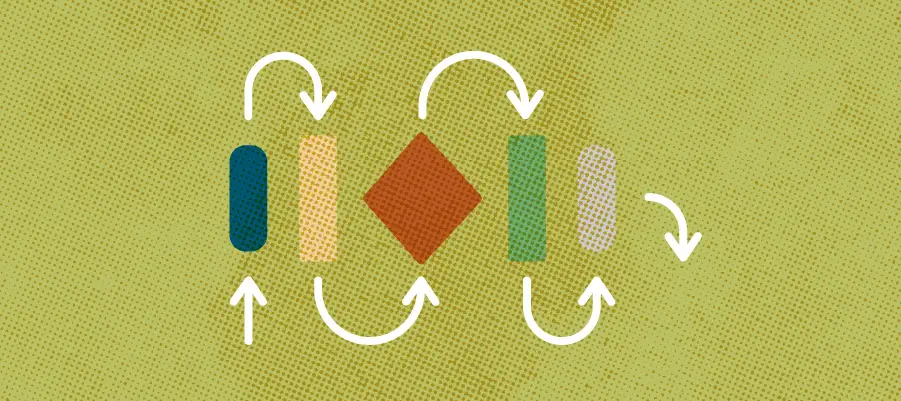
From here the work splits into two tracks that run side by side: one for how the site looks and feels, one for how its content is structured. Running them together means the design and the content are ready at the same time, and neither one waits on the other.
Look & feel: wireframes, then design mockups
First we sketch page layouts without color or images, so we agree on what goes where before deciding how it looks. The wireframes are clickable, so you can move through key layouts and comment on them while problems are still easy to fix. Then comes the visual polish: typography, color, imagery, motion, the brand language that makes the site unmistakably yours, shown in full color on desktop and mobile. If your project includes a new logo or brand, you’ll see how it shapes every page. Because the layout decisions were already made, design is about expression, not renegotiation, and you approve the look before anything is built. The question this path answers: does this feel like us?
Structure: content types, then the database
At the same time, we define the building blocks behind your pages: each kind of content the site holds — staff, events, programs, resources — and what each one includes. Then we set up those content types in WordPress and load your real content. This is the database approach described above, put to work: everything is entered once, shows up wherever it’s needed, and is already in place when the design arrives.
4. Build
The two paths meet here. We apply the approved design to the content that’s already in place, on a private staging site you can preview anytime. This is also when we train your team — documentation, guidance, and the confidence to keep your content fresh without knowing a line of code.
5. Launch & support
Before going live, we test the site carefully across devices. Then we launch, and we keep an eye on speed and security afterward. We build for the long term, which means the real deliverable isn’t just a launched website; it’s a website your team can live in for years.
lessons learned
We learned something important about what a website can be during our work on the Power Past Coal project — a multistate campaign to prevent coal train traffic through communities across the Pacific Northwest. When we started, we thought we were building a website. What we discovered, as we got deeper into the work, was that we were building a platform for an ongoing conversation among community leaders from remarkably different backgrounds: public health advocates, safety officials, environmental organizers, local residents with very different relationships to the same issue. Hundreds of communities were touched, in profound ways, by what was being debated. This wasn’t a question of awareness alone — it was a question of focus and collective action across a sprawling, diverse coalition.
The best website design process serves the people who maintain the site as much as the people who read it.
The surprise was this: who was making the content turned out to matter as much as who was reading it. The diversity of voices wasn’t a complication to be managed — it was the whole point. Which meant the site had to be genuinely easy to update, not just easy in theory. And here is where we ran into something uncomfortable and true: even when we simplified as thoughtfully as we knew how, some contributors simply didn’t have the bandwidth — or the comfort — to manage a content system on their own. We had to meet them where they were. We built additional tools. We sometimes made updates ourselves. We learned, again, that a site is only as good as it is easy to keep up.
The campaign ultimately worked across websites, videos, maps, signage, flyers, and other materials — a chorus of deliverables that succeeded not because they carried a single unified message, but because they created space for many messages to exist and reinforce each other. No one piece of content could have carried that weight alone.
Kimberly Larson at Climate Solutions put it this way: “Shew Design is a key partner and contributor in our campaigns. They care about their clients and take care of their needs from soup to nuts.”
That’s the kind of work we want to do. Not a handoff, but a partnership — from the first planning conversation to the training session after launch, and through all the updates that come after. A website that serves you well isn’t finished when it goes live. It’s finished when you don’t need us anymore to keep it going. If you want to learn more about the website design process, check out our post about preparing for a website project: what to sort out before design starts.